Mac energy monitor for your apps.
See which apps are using the most power on your Mac. Tend shows estimated watts for each app and ranks their energy use over the last 24 hours for free.
Apple silicon · macOS 13 or laterFree download. No account needed.
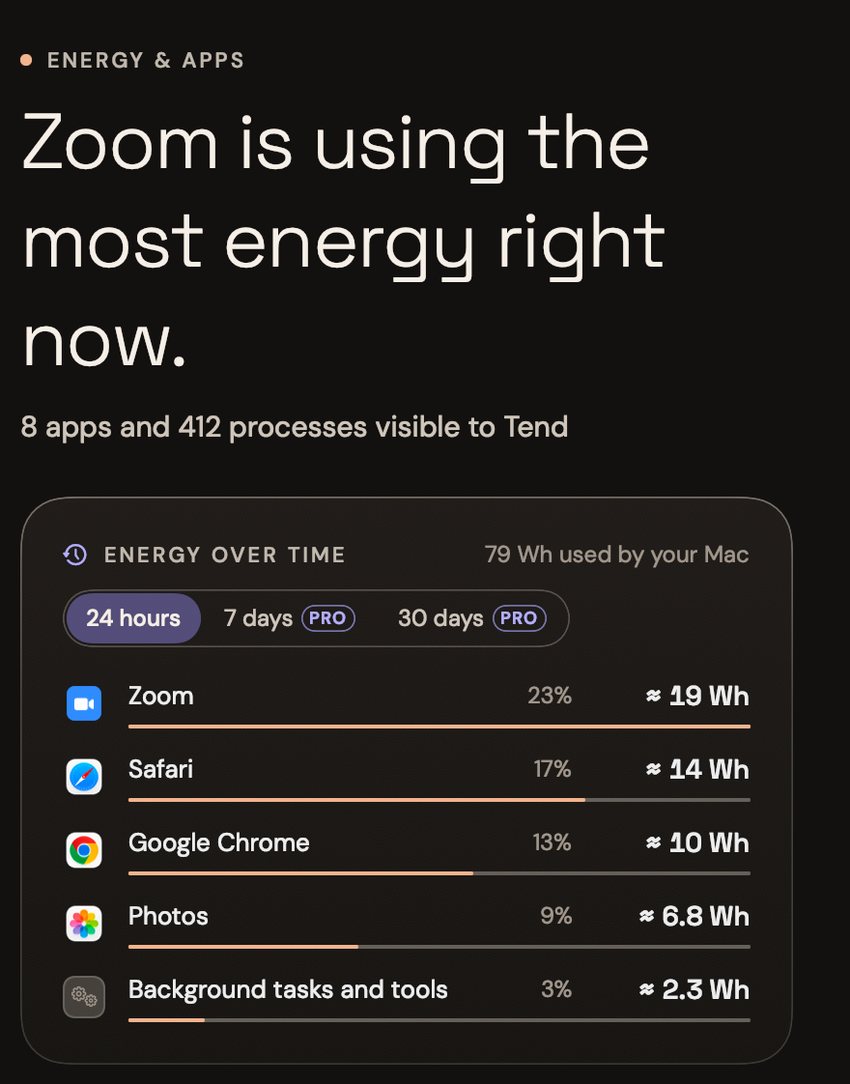
App power in watts and energy in watt-hours
- Estimated app watts
- Tend reads your Mac’s power telemetry, then estimates each app’s share using processor and graphics activity. Estimates carry an ≈.
- Energy across a period
- See which apps used the most energy while Tend was running. Simple view shows shares; Advanced view adds watt-hours.
System telemetry and per-app estimates are different measurements. Your energy history stays on this Mac.
Today is free. Keep the longer view.
FreeLive readings + the last 24 hours
- Estimated watts, CPU and memory for your apps
- 24-hour energy totals and shares
- Quit an app when you are finished with it
ProAdd 7-day and 30-day views
- Compare app energy totals across longer periods
- Get an alert when an app drains power on battery
- Run a heavy app at lower priority
History shows totals for each period, not a replay of an app’s past watt readings. Lowering priority does not set a wattage limit.
A few useful distinctions.
How do I find which app is draining my MacBook battery?
Open Energy & Apps and check live watts for a spike or the 24-hour view for sustained use. A short spike and hours of steady use can tell different stories. Per-app watts are estimates, and history builds while Tend runs.
Will I see every background process?
The app list covers your user account. System-owned services are not listed individually; their work can contribute to the macOS share. Use Activity Monitor when you need to inspect processes from every user.
Will my history appear immediately?
Live readings arrive first. History builds as Tend runs and initially needs time to collect data. It cannot reconstruct energy use from before it was running.
Is this the same as measuring electricity at the wall?
No. Tend uses readings reported by your Mac. A wall meter also captures power-adapter losses and anything else connected through it. The MacBook watts guide explains what each measurement means.
Meet the apps behind the watts.
Download Tend and open Energy & Apps. Live estimates and 24-hour history are free.