Look after your Mac. It’ll look after you.
Understand your Mac’s battery, heat and storage. Know what to do next.
Free · no account · about 9 MB
Apple silicon (M1 or newer) macOS 13 Ventura or later
Will it run on my Mac?
Open the Apple menu › About This Mac. If it shows an Apple M1 chip or newer and macOS 13 or later, it will. Desktop Macs too: everything except the battery features. On an Intel Mac, our free guide shows how to check your battery without an app.

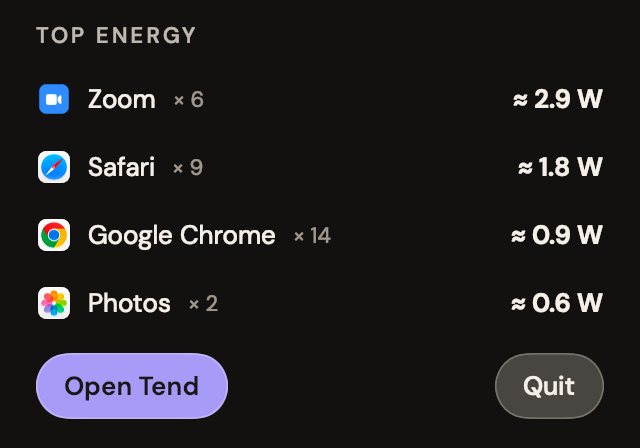
Your Mac is working hard, mostly for Zoom.
Example: Zoom ≈ 2.9 W. Higher watts, faster drain.
Why?
macOS reports slightly raised temperatures, which is normal under load. Performance isn’t affected.

Why? macOS reports slightly raised temperatures, which is normal under load. Performance isn’t affected.
Your Mac is working hard, mostly for Zoom.
- Notarized by Apple
- No ads or tracking in the app
- No special access needed
- Check its battery use
- Light on battery
How to install
- Download Tend-latest.dmg (about 9 MB)
- Drag Tend to Applications
- Open it: it lives in your menu bar
Reviewed on
Written about in
Every reading comes with a next step.
Tend measures on your Mac and explains each reading in plain words.
-
What’s draining my battery?
See which app is using your battery right now, and quit it from Tend.
Details about energy
- Freelive, with 24 hours of history.
- Pro7 and 30 days, and a warning when an app runs away on battery.
Tend measures what your whole Mac draws, then shares the part above idle among your apps by their processor and graphics work. So per-app watts are estimates, marked ≈.
See what watts measure on a Mac.
Explore Tend’s energy monitor.
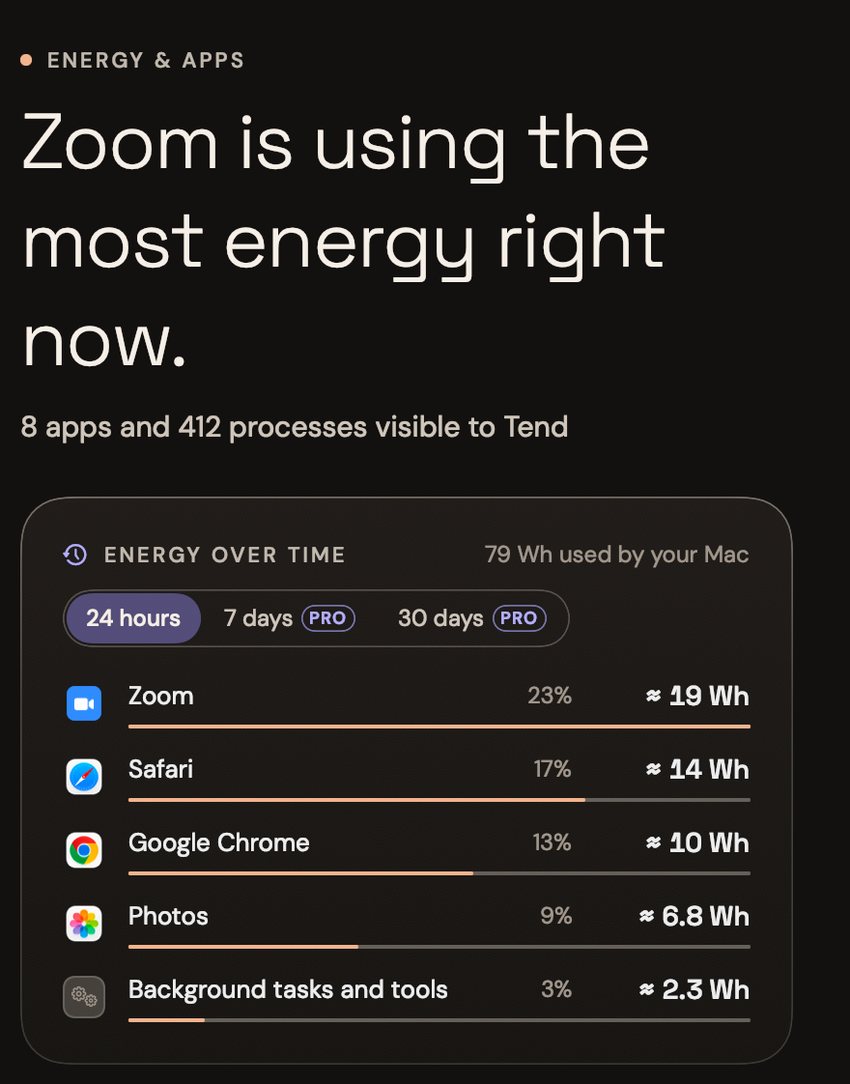
Energy & Apps: each app’s share of your Mac’s energy over 24 hours, on a MacBook Air with sample apps. -
Is my battery wearing out?
Know how much your battery holds today, and whether the way you charge wears it.
Details about the battery
- Freehealth and Battery Coach’s advice.
- Prohealth over months, and an unplug reminder.
Out of warranty, a new battery from Apple costs $159–$249 for a MacBook Air or MacBook Pro, as listed on Apple’s US repair page on 27 October 2026.1
Battery health is the Maximum Capacity macOS reports, recorded every day with its charge cycles. Heat and long hours at 100% speed up wear; macOS 26.4 Tahoe or later can cap charging with its free Charge Limit. AppleCare+ replaces a battery that holds less than 80% of its capacity.2, 3
Look up battery capacity by model and Apple’s rated cycle limits.
Try the battery life calculator with your own workload.
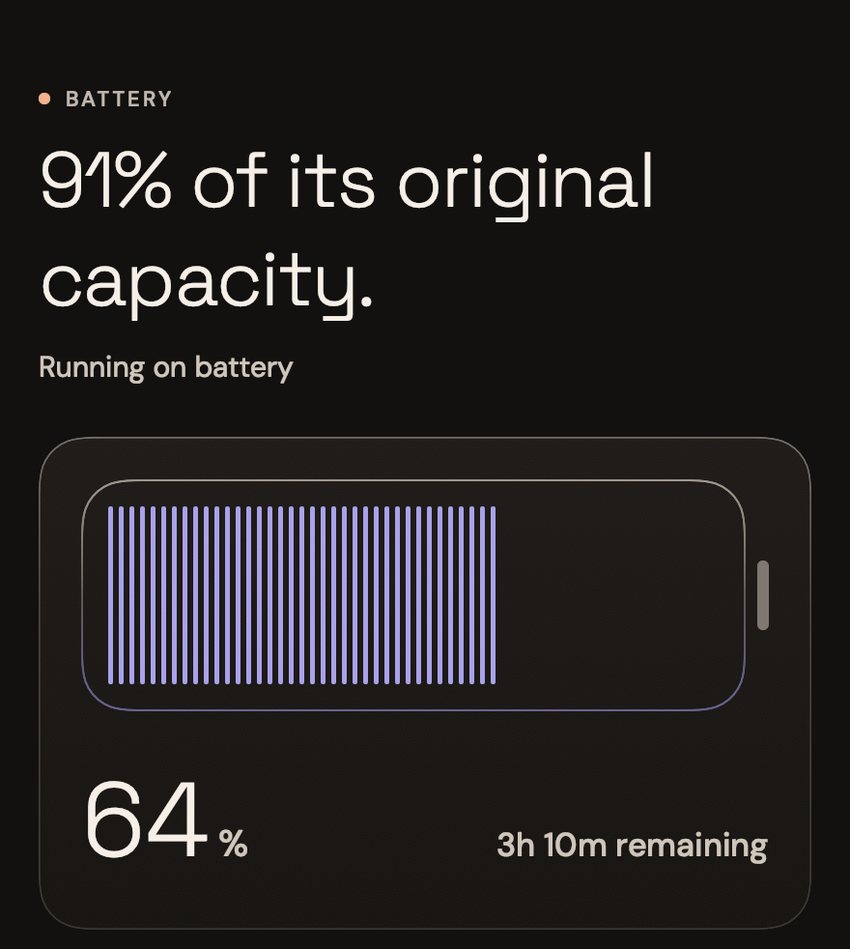
Battery: health is how much charge it holds compared with when it was new. -
Is my Mac running too hot?
Know when macOS says it’s managing heat, and which apps are making it work.
Details about heat
- Freethe hottest part of the processor, and macOS’s heat level.
- Proevery sensor, alerts, and the fans on Macs that have them.
Apple silicon runs warm by design, so a high number alone isn’t a problem. Tend reads macOS’s own thermal pressure (Normal, Fair, Serious or Critical) next to the sensors. Fanless Macs, such as the MacBook Air, slow down instead of spinning fans.
Explore Tend’s temperature monitor.
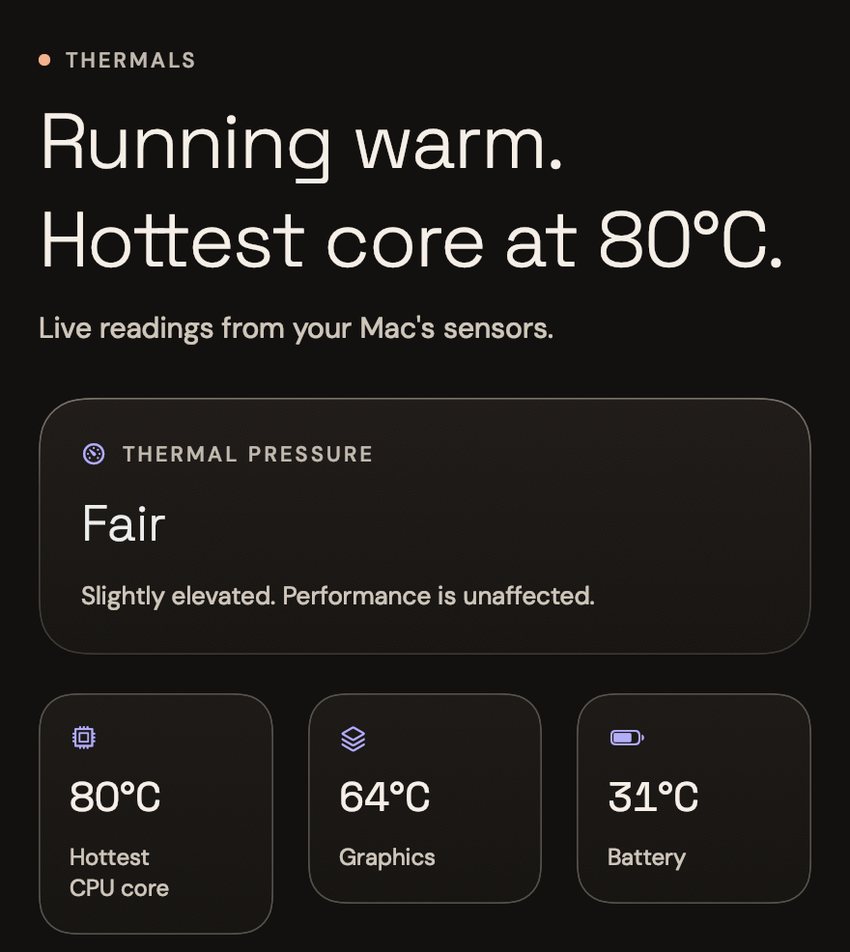
Thermals: macOS’s own heat level, and the hottest part of the processor. -
What’s using my storage?
See what’s filling your disk, and move what you don’t need to the Trash.
Details about storage
- Freesee it all, and open any of it in Finder.
- Proclear it in one click, and uninstall apps.
Caches, logs, old installers, large and old files, duplicates and similar photos, in your home folder. Caches rebuild themselves. The health score counts how full the disk is, never “junk”: the companion gets a box under 18% free, and a full room under 8%. What you choose goes to the Trash, where you can put it back.
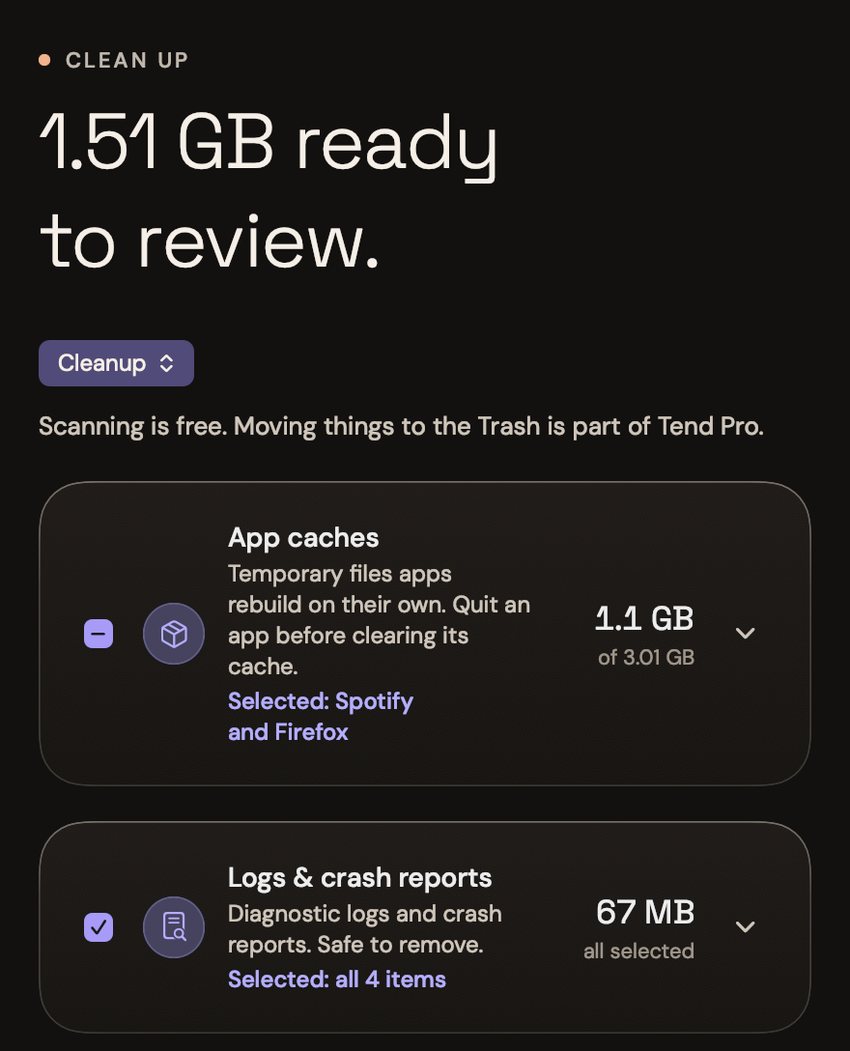
Clean Up: seeing it is free; moving it to the Trash is Pro. -
Is everything up to date?
Keep macOS and your apps up to date, and your security settings checked.
Details about updates
- Freeeverything here.
Apple’s updates, App Store apps (with the free mas tool) and Homebrew are checked in the background every 6 hours; apps that update themselves through Sparkle, when you open the Updates page. Tend installs Homebrew and App Store updates; macOS updates open in Software Update. The security check covers FileVault, the firewall, Gatekeeper and System Integrity Protection.
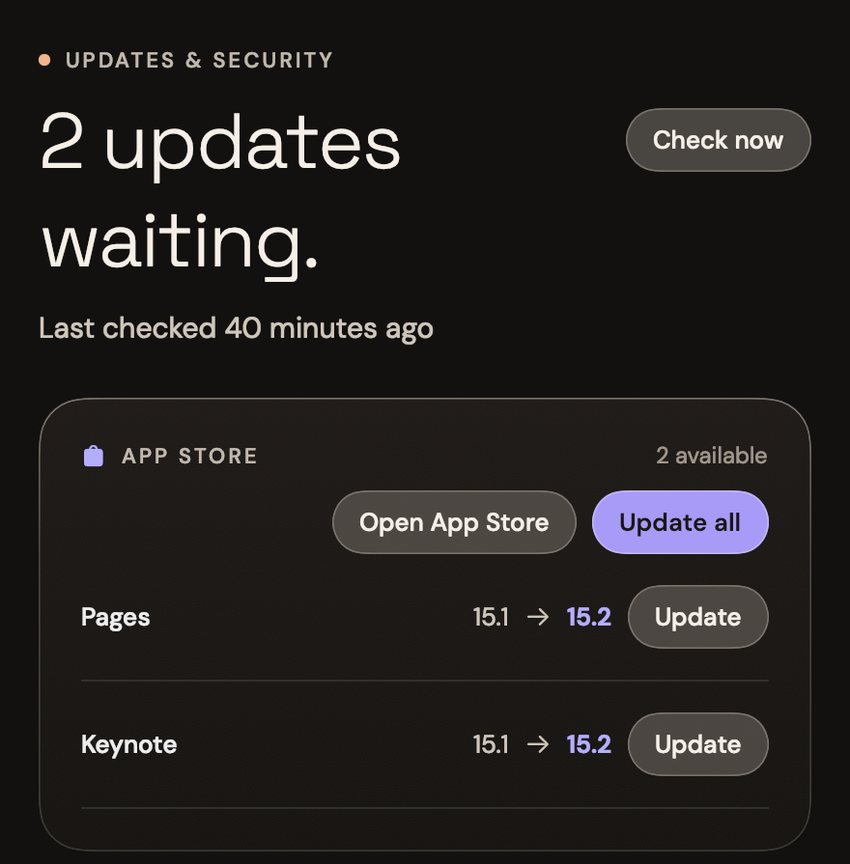
Updates & Security: two App Store updates; macOS is up to date.
A little help, throughout your day.
- Widgets at a glance
- Siri and Shortcuts
- Weekly reports with Pro
A little soul for your Mac.
Six companions. One that feels like yours. Always optional.






It always says why.
Its mood follows your Mac. A small nudge to take care of it.
- Ember is out of breath. One app has drawn 8 W or more for 5 minutes. What helps: “See what’s using energy” in Tend.
- Ember is hungry. Your Mac is on battery at 15% or less. What helps: plugging in the power adapter.
- Ember is a little warm. macOS reports raised temperatures, or a processor core runs hot. What helps: “See what’s using energy” in Tend.
- Ember’s room is getting cluttered. Less than 18% of the startup disk is free. What helps: “Open Clean Up” in Tend.
- Ember needs a checkup. A macOS update is waiting, or a security feature is off. What helps: “Open Updates” or “Review security settings” in Tend.
- Ember is content. When nothing else applies: temperatures, battery, storage, macOS updates and security all look fine.
The six companions, how they grow, and what they wear
- Optional: one switch in Settings takes it off the Overview.
- On your desktop only if you turn it on. It rests when you can’t see it, in Low Power Mode or when your Mac runs hot.
- Prefer numbers? Advanced view keeps every one.






Its mood comes mostly from Tend’s readings, plus the time of day and the care steps you take in Tend. It never dies, has no streaks and sends no notifications of its own.
It grows with good days and never goes back. A good day is one when your Mac’s typical health score is 75 or more over at least 30 minutes Tend sees.




Five badges come from how your Mac is doing, one from choosing a companion, and one when a friend uses your invite; none can be bought. Each unlocks something to wear.





Careful with your Mac and your files.Light on your Mac. Careful with your files.
Notarized by Apple
No special access needed
Your readings stay on your Mac.
The details
- Notarized by Apple
- Every release is notarized before it’s published: Apple checks it for malware. The Terminal check below shows it.
- A named developer
- He signs every release with his Developer ID, and a person answers every email. About the developer
- No special access
- It works without Full Disk Access, Accessibility or Screen Recording. Clean Up’s scan offers Full Disk Access so macOS doesn’t ask about each folder, or you can allow just Desktop, Documents and Downloads. Clearing Safari’s data and Recent Items needs it too.
- Your password
- Clearing the DNS cache, rebuilding Spotlight’s index, removing local Time Machine snapshots and switching a system startup item ask for your administrator password each time. No privileged helper is installed.
- Your readings
- No ads or tracking in the app; usage statistics only if you say yes. It talks to tendmac.app, and to Apple, Homebrew and your apps’ update feeds. What’s sent
- Removing things
- What you choose goes to the Trash. Shredder, local Time Machine snapshots and saved form entries in Chrome-style browsers are removed for good, after Tend asks.
Check it yourself in Terminal
After installing, paste this into Terminal (in Applications › Utilities):
spctl -a -vv /Applications/Tend.app
/Applications/Tend.app: accepted
source=Notarized Developer ID
origin=Developer ID Application: Mohamed Elsawy (FCP648KVG2)
“Notarized Developer ID” means Apple checked it, and the last line names the developer. If you see anything else, don’t open it, and tell us at support@tendmac.app. Tend’s own updates are signed too, and checked before they install.
What Tend doesn’t do
- It doesn’t stop charging. macOS 26.4 Tahoe or later can, with its own Charge Limit (80–100%).3
- Per-app watts are estimates, not meter readings. Tend never changes fan speeds (on Macs that have fans).
- It doesn’t delete without asking, and it can’t shrink the System Data in your storage settings.
In their words
What people say about Tend.
Shared by people who use Tend, with their permission and their first name. Some are shortened. Tell us yours
Free for good. More with Pro.
Free
$0 for good, on any number of Macs
Your Mac’s essentials. Every companion. No account needed.
Pro Up to 3 Macs
Longer history. Timely alerts. One-click cleanup.
Yearly
$12.99 a year
Monthly
$1.99 a month
Lifetime
$29.99 once
Yearly starts with a 7-day free trial.
Compare every Free and Pro feature
Prices in USD, excluding sales tax or VAT, which is added at checkout where it applies. Stripe is the merchant of record. Terms & refunds
Use Tend with what you already have.
On macOS 26.4 Tahoe or later, your Mac can already stop charging at a limit. Tend tells you why the battery drains, and what to do about it.
Compare with other Mac apps
- TendFree · Pro $12.99 a year or $29.99 onceBest at: battery, watts per app, heat and storage, with a next step
- StatsFree, open sourceBest at: many menu bar monitors at once
- AlDenteFree · Pro $13.99 a year or $24.99 onceBest at: stopping the charge at any level
- iStat Menus 7$11.99 onceBest at: deep sensor detail, and fan control
- CleanMyMac$39.95 a year or $119.95 onceBest at: all-in-one cleaning and maintenance
Prices from each developer’s site, checked 11–27 October 2026 · Sources
How is Tend different from other apps?
| Tool | Price, 1 Mac (US) | Runs on | Best at |
|---|---|---|---|
| Tend | Free · Pro $1.99/mo, $12.99/yr or $29.99 once, up to 3 Macs | Apple silicon, macOS 13 or later | Battery, energy per app, heat and storage explained, with a next step |
| Built into macOS | Included | Charge Limit: macOS 26.4 Tahoe or later | Stopping the charge at 80–100%3 |
| AlDente | Free · Pro $13.99/yr or $24.99 once, up to 3 Macs10, 11 | macOS 12 or later, MacBooks, Intel too9 | Stopping the charge at any level you set, below 80% too8, 9 |
| iStat Menus 7 | $11.99 once15 | macOS 13.5 or later12 | Deep sensor, disk and network detail, and fan control12, 13 |
| Stats | Free, open source (MIT)17 | macOS 12 or later, Intel too17 | Many free menu bar monitors at once |
| coconutBattery | Free · Plus is a one-time purchase18 | macOS 12 or later18 | Battery health for Macs, iPhones and iPads, with a free history18 |
| CleanMyMac | $39.95/yr or $119.95 once19 | macOS 11 or later19 | All-in-one cleaning and maintenance, malware removal and an uninstaller19 |
| Sensei | $29/yr or $59 once, up to 3 Macs20 | macOS 14 or later21 | Monitoring with a thermal dashboard and fans, a cleaner, an uninstaller and drive health20 |
Feature by feature
| Capability | Tend | Built into macOS | AlDente | iStat Menus 7 |
|---|---|---|---|---|
| Price and fit | ||||
| Price, 1 Mac (US, before tax) | Free · Pro $1.99/mo, $12.99/yr or $29.99 once1 | Included | Free · Pro $13.99/yr or $24.99 once, up to 3 Macs10, 11 | $11.99 up front15 |
| Requires, another tool does more here | Apple silicon, macOS 13+ | Charge Limit: macOS 26.4+3 | macOS 12+, MacBooks only9 | macOS 13.5+12, 16 |
| Battery and power | ||||
| Per-app power in watts | ●Yes, estimated · Free | ○No · relative, no units5 | ○No · whole Mac only8 | —Not listed12 |
| Stops charging at a set level, another tool does more here | ○No · unplug reminder (Pro)2 | ●Yes · 80–100%, macOS 26.4+3 | ●Yes · Free7, 8, 9 | —Not listed |
| Battery health over time | ●Yes · Pro, daily reading3 | —Current reading only4 | —Not listed | —Trend not stated14 |
| Heat | ||||
| Temperatures and fans, another tool does more here | ●Free: hottest core and pressure · Pro: every sensor, and the fans (read-only) on Macs that have them | —Not listed | ◐Partial · battery temperature8 | ●Yes · fan control (website version)12, 13 |
| Storage | ||||
| See what’s using your storage | ●Yes · view Free, Trash Pro4 | ◐Partial · when space is needed6 | —Not listed | —Not listed |
| Uninstall apps with their support files | ●Yes · Pro | ◐Partial · leftovers not mentioned6 | —Not listed | —Not listed |
Notes on the Tend column
- Yearly starts with a 7-day free trial. Up to 3 Macs per license. Terms & refunds
- macOS’s Charge Limit stops charging. Tend advises and shows whether it’s on (free), and reminds you to unplug (Pro).
- Tend records one reading a day for everyone; the chart is in Pro.
- Your home folder only. What you choose goes to the macOS Trash, where you can restore it.
From each vendor’s own pages and Apple Support, checked 11–27 October 2026. US prices before tax, for one Mac. Tend isn’t affiliated with any company named here. Out of date? Email support@tendmac.app. All sources
Questions
Good to know
For anything else, write to support@tendmac.app.
How do I install it?
- Download Tend-latest.dmg and open it.
- Drag Tend into your Applications folder.
- Open Tend. It appears in your menu bar. Because it comes from the internet, macOS asks once whether to open it; it’s notarized by Apple, so click Open.
Will Tend drain my battery?
Measured: Tend’s 12 hr Power in Activity Monitor’s Energy tab was about , with its window closed, on a with macOS , on .
To see its effect on your Mac, open Applications › Utilities › Activity Monitor, click Energy and find Tend.
With its window closed, Tend mostly rests between short readings (every 10 to 60 seconds) and checks for updates every 6 hours. Check for yourself in 30 seconds: open Applications › Utilities › Activity Monitor, click Energy and find Tend.
The timings: with its window closed, a light reading every 10 seconds, the battery and sensors every 30 seconds, every app once a minute, the security settings every hour, and updates and its own license and settings every 6 hours. With the window open it refreshes every 1 to 5 seconds, as you choose. In Low Power Mode the frequent ones come half as often. The companion on your desktop, if you turn it on, moves only while you can see it, and not in Low Power Mode or when your Mac runs hot.
Does Tend stop my Mac charging at 80%?
No. On macOS 26.4 Tahoe or later, macOS’s own Charge Limit can hold the charge between 80% and 100%. Tend tells you whether a limit is worth it (free) and can remind you to unplug (Pro).3
My Mac gets hot. Is that a problem?
Usually not. Apple silicon runs warm under load, by design. What matters is whether macOS says it’s managing heat. Tend shows that next to the hottest reading and, when it’s hot, which apps are doing the work.
Does Tend change files on my Mac?
Only the ones you choose, and they go to the Trash, where you can put them back; Tend never empties it. Three things are removed for good, after Tend asks: files you shred, local Time Machine snapshots, and saved form entries in Chrome-style browsers. Seeing your storage is free; clearing it is Pro.
Is the companion just a game?
No. Its mood comes mostly from Tend’s readings, plus the time of day and the care steps you take in Tend, and Why? names the reading. It never dies, has no streaks and sends no notifications of its own. Advanced view keeps every number, with one small card for it; Show on the Overview, in Settings, takes it off both views. On the desktop, it’s off until you turn it on.
Which Macs does it work on?
Macs with Apple silicon (M1 or newer) on macOS 13 Ventura or later. Desktop Macs too: everything except the battery features. The app is in English, French, German, Spanish and Japanese.
Can I install it on a school or work Mac?
Often, but ask whoever manages it first: managed Macs can block apps from outside the App Store. Tend needs no administrator password to run. Copying it into Applications may ask for one, and the few system tasks above ask each time.
What leaves my Mac?
What Tend measures stays on your Mac. The app has no ads or tracking, and no analytics except optional usage statistics, sent only if you say yes. It contacts our server for app updates; at launch and every 6 hours to check whether Pro checkout is open and your license is valid (on a licensed Mac, also when you come back to Tend after an hour); at most once a day for when to ask for feedback; for your email and your Mac’s name and model if you sign in; and for feedback when you send it. Privacy policy
Why isn’t it on the App Store?
App Store apps run in a sandbox, and Tend needs things it doesn’t allow: running macOS’s own update tools and Homebrew, cleaning up across your home folder, admin tasks such as flushing the DNS cache, switching startup items, and updating itself. So it comes from tendmac.app, notarized by Apple.
How do I remove it?
Quit Tend from its menu bar icon and drag it from Applications to the Trash. A few small files stay in your Library folder; the uninstall guide lists them, and how to free your Pro license for another Mac first.
Is there a free trial?
The free version has no time limit. Yearly Pro starts with 7 days free, one trial per person. And within 14 days of any charge, you can ask for a full refund at support@tendmac.app.
Questions about your Mac itself? Our guides explain how to check your MacBook’s battery health, why a MacBook runs hot, why a Mac gets slow and how to free up space safely. All guides
Get Tend updates
New features and tips, about once a month. Unsubscribe any time.
Look after your Mac. It’ll look after you.
See what’s draining your battery, and what helps. Free to use; Pro from $12.99 a year.
Apple silicon · macOS 13 Ventura or later · about 9 MB
Sources and notes · checked 11–27 October 2026
Apple
- support.apple.com/mac-laptops/repair?services=service
- support.apple.com/en-us/108376
- support.apple.com/en-us/102338
- support.apple.com/guide/mac-help/mchlfc3b7879/mac
- support.apple.com/guide/activity-monitor/view-energy-consumption-actmntr43697/mac
- support.apple.com/guide/mac-help/change-storage-settings-mchl3d437fbc/mac and support.apple.com/guide/mac-help/optimize-storage-space-sysp4ee93ca4/mac
AlDente
iStat Menus
Others
- Stats · github.com/exelban/stats and mac-stats.com
- coconutBattery · coconut-flavour.com/coconutbattery
- CleanMyMac · macpaw.com/store/cleanmymac and macpaw.com/cleanmymac
- Sensei · cindori.com/store/sensei and cindori.com/sensei
- Sensei’s requirements · cindori.com/reviews/stats-vs-sensei-mac-monitoring
Tend’s own claims describe the current public build. Per-app watts are estimates. Battery health is the Maximum Capacity macOS reports; the 0–100 health score is Tend’s own. Prices and features of other apps as listed by each vendor, checked 11–27 October 2026.